Downloading your SOL (School of Open Learning) marksheet is a straightforward process, but it can feel a bit daunting if the website is lagging or if you aren’t sure which details to enter. Whether you are a student at DU SOL or another regional Open Learning board, having a digital copy of your marksheet is essential for higher education applications and job verification.
In this guide, we’ll walk you through the steps to download your marksheet quickly and troubleshoot common errors.
Prerequisites Before You Start
Before logging into the portal, make sure you have the following details handy:
- SOL Roll Number (Format: XX-X-XX-XXXXXX)
- Date of Birth (As per your 10th-grade certificate)
- Examination Roll Number
- Year of Passing/Semester details
How to Download Your SOL Marksheet
- Step 1: Visit the Official Website
Go to the official DU SOL website at sol.du.ac.in. Look for the “Student Support” or “Examination” tab on the homepage.
- Step 2: Navigate to the Marksheet Section
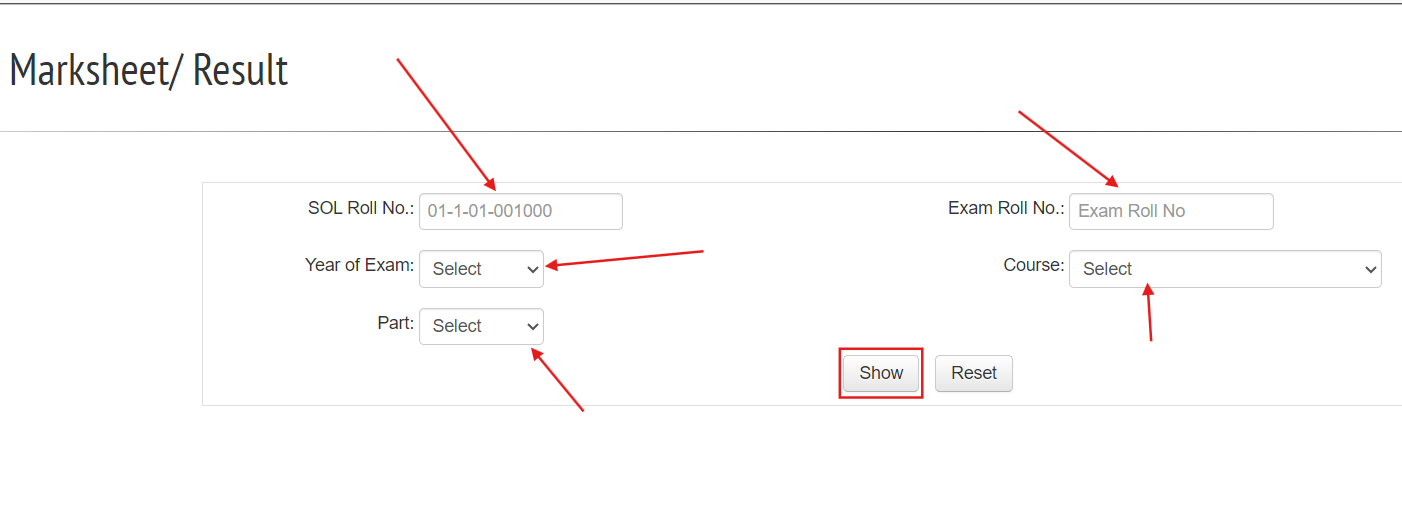
Click on the link labeled “Mark-sheet/Results.” This will redirect you to a portal where you can access results for Undergraduate (UG) and Postgraduate (PG) courses.
- Step 3: Enter Your Credentials
You will see a form asking for specific details. Enter them carefully:
- Select College Name: Usually “School of Open Learning.”
- Exam Session: Select the month and year you appeared for the exam.
- Exam Roll Number: This is different from your SOL roll number.
- Date of Birth: Use the calendar widget provided on the site.
- Step 4: Search and Print
Click on the “Print Scorecard” or “Show Scorecard” button. Your marksheet will appear on the screen.
💡 Pro Tip: Don’t just look at it! Immediately click on “Print” and choose the “Save as PDF” option to keep a copy on your device.
Common Issues and Solutions
| Problem | Solution |
| Site Not Loading | The server often crashes during result days. Try accessing the site late at night or early in the morning. |
| “Record Not Found” | Re-check your Date of Birth format. Ensure you have selected the correct Exam Session (e.g., Nov-Dec vs. May-June). |
| Discrepancy in Marks | If you see “ER” (Essential Repeat) or “AB” (Absent) incorrectly, visit the SOL administrative office in North or South Campus with your admit card. |
Important Note on “Provisional” vs. “Original”
The version you download online is a Provisional Marksheet. While it is valid for most immediate needs (like applying for an internship), for formal government jobs or permanent records, you will eventually need the physical degree/marksheet issued by the University.